| Email:
roizen@ix.netcom.com
References: https://en.wikipedia.org/wiki/T/Maker https://en.wikipedia.org/wiki/Peter_Roizen My Other Idea: WildWords Crossword Game Here is a short book. Please read two chapters. I will make some outlandish claims I believe to be true. |
| Download For Free Click Here New: Link for downloading examples available on that page. This is Part 1 Advance to Part 2 |
Click here for a must-see Look-and-Feel introduction. The first 27 seconds could be Lesson 1
T/Maker is an unprecedented way to do calculations across two dimensions. It is a new environment and language. You can start using it only knowing whole numbers and the basic symbols of arithmetic. Yet it can calculate anything and everything most users might need. So what is this unprecedented stuff?
The classic formula in algebra that yields a single result has been discarded. Instead there are trails of operators mixed with references to values, placements of results, and name-your-own memory slots. These "calculation trails" can be reused with a mouse click at another location. Multiple ways to identify cells in conjunction with memories often eliminate the need for mistake-prone cell names. Trails are more versatile, easier to follow, and simpler to modify than the collection of formulas they replace.
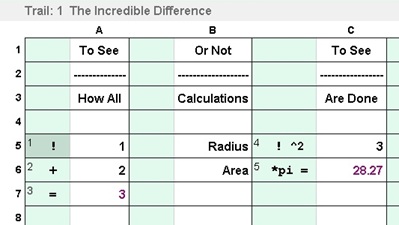 In addition to the language, there are built-in manipulations that
provide auxiliary support. You can cut and paste a trail to move it out
of the way. You can insert rows that are clones of the one above. You can
autosize columns to get more space for the trails or for the data.
T/Maker is a completely new approach built up from ground level
with arithmetic. You can see the data and calculations on the screen at the same time.
Also, there is a debugger that can walk through your calculations step
by step as you watch it.
In addition to the language, there are built-in manipulations that
provide auxiliary support. You can cut and paste a trail to move it out
of the way. You can insert rows that are clones of the one above. You can
autosize columns to get more space for the trails or for the data.
T/Maker is a completely new approach built up from ground level
with arithmetic. You can see the data and calculations on the screen at the same time.
Also, there is a debugger that can walk through your calculations step
by step as you watch it. T/Maker is not a perfectly rounded-out product. Things could be improved including graphics, printing possibilities, and more built-in functions. However, it is not just a collection of ideas or a call to rally. The hard work has been done. The core approach to math is solid and can be used productively. Documentation and tutorials will soon be completed. T/Maker might start creeping into households and maybe classrooms as some crazy weird thing for sharing on Fridays. 4,000 year-old algebra might soon be turning in his grave.
If T/Maker should become popular a software giant might take it over or copy the interface in a new product. I do not have the time and resources to do much more than advise on a good design and game plan as well as provide the code for what is now. Hopefully T/Maker could maintain a permanent spot on the shelf as "a spreadsheet for everyone." This evolving epiphany has always been a personal responsibility to me. I will not give it less than my best effort. If you like and appreciate what you see, please help make success more likely by passing on a link to persons who would never discover it otherwise.
T/Maker: What do you see?
 I see a classroom at Fairmeadow Elementary School circa
mid-fifties. I am learning arithmetic. The air is devoid of projectiles or
wisecracks. Everyone is paying attention. No one doubts the utility of
what they are doing. Math is off to a good start.
I see a classroom at Fairmeadow Elementary School circa
mid-fifties. I am learning arithmetic. The air is devoid of projectiles or
wisecracks. Everyone is paying attention. No one doubts the utility of
what they are doing. Math is off to a good start.Way back then, there were just two kinds of athletic footware. Connoisseurs of the industry knew them as high tops and low tops. That category of stuff like many others has since exploded with undreamed of options. But what about math? What's been or appeared to do calculations masterfully?
The slide rule had been around for over four centuries. It had an embarrassing problem with accuracy. You could multiply 60 by 2 and then by 5 and come up with the answer of 599.1. Even so, people went to the moon and back on the abilities of slide rules. The hand calculator came on the scene in the seventies. It was and remains popular, because it's easy to use and accurate. A decade later the spreadsheet appeared and started to gain an audience on a new kind of household appliance.
The spreadsheet did not share the hand calculator's intuitive approach. It was based on something called "algebra." In arithmetic you generally follow a known procedure to determine a more complicated value from others. In algebra you look at formulas as describing a sort of truth or equality. Example: Total = (Quantity * Price) + Tax. This perspective allows you to find out what some unknown values are, when you know other ones. In truth, very few people are actually figuring out the price of a banana from a grand total, tax, the cost of all the other items, and the number of bananas. That is a very oversimplified stupid example of the concept. Even so, a course on algebra will include examples which are much less likely to occur than the big banana investigation.
Sadly a knowledge of the whole bag of algebra is a prerequisite to many subjects whose basics could be taught without that requirement. If you can do the math without algebra, learning algebra is a heavy price to pay to work with a screen, printer, and electronic filing system. No one had to learn the intricacies of a semicolon or Oxford comma before typing on a word processor. I am not disputing that everyone should be capable of understanding clearly written algebraic equations. And working with algebra is essential to many scientific professions. The world advances on the strength of such formulas. But a much greater population could meet all their requirements 10 times more easily if they had T/Maker to unleash and organize the power of arithmetic.
Algebraic spreadsheets: The devils are in the details.
 Excel
is the name of a Microsoft spreadsheet which is probably the most
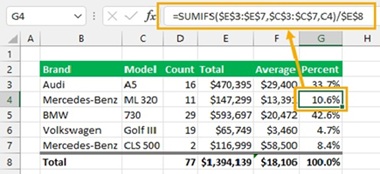
recognized one in the world. A search for "Excel with a formula"
turned up the image to the right. An average and
a percent column are calculated along with four column totals. That
makes 14 calculated values using three underlying formulas. Generally
in Excel, calculated cells have an algebraic formula in them which amounts to 14 formulas in this case. Sometimes they
are generated automatically.
Excel
is the name of a Microsoft spreadsheet which is probably the most
recognized one in the world. A search for "Excel with a formula"
turned up the image to the right. An average and
a percent column are calculated along with four column totals. That
makes 14 calculated values using three underlying formulas. Generally
in Excel, calculated cells have an algebraic formula in them which amounts to 14 formulas in this case. Sometimes they
are generated automatically. There is an arrow that points to the formula for the 10.6 value. It would be one of six different formulas used to derive all values in the column. Besides looking like gibberish, input values needed by a formula are most often referenced by their cell names. These are just physical locations providing no clue as to what that value represents.
In addition to names for values, these formulas also rely on parentheses and rules of precedence to determine how the formula is calculated. You can't just start calculating on the left and continue to the right, or top to bottom. Algebra derails that train of thought. The claim is made that these complexities build "critical thinking." To me, useful critical thinking is figuring out the progression of calculations needed. How to write out a calculation as text more fits the description of grammar.
At best, Akgebra is a sort of Pig Latin that requires an annoying translation to and from arithmetic. There are millions of puzzles on the Internet that suggest you have a genius IQ just for understanding how one formula is actually computed. It is sad to see such a waste of time and silly portrayal of mathematics. But this parody does suggest algebra has a Houston problem. Adding to the misery, the unit of work is one formula which calculates only one single value.
The formula does not itself carry information of where it fits in with other formulas. The collection of formulas is effectively a bag of jigsaw puzzle pieces that you, the author, never place in any relative position explicitly. You let the spreadsheet develop something called a "dependency chain." Along with that concept goes a list of errors that might arise with formal names. Each one could rattle your chain. An amusing slang term for the cells affected by a chain error was "blast radius."
Let's move on to something less explosive.
Calculating in T/Maker: The devils have left the building.
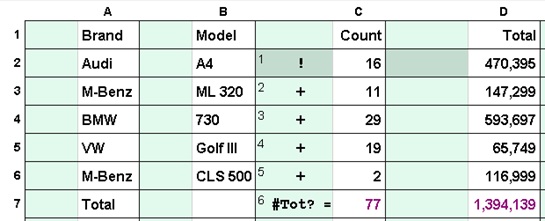 We will do the same computations in T/Maker. Three
"calculation trails" will specify the three calculations required. Darkened
squares will show the locations from which each trail should be used or
reused starting with Step 1 at that dark square.
That's a total of 14 locations to calculate those 14 results. You don't
need to have a total of 14 variations of the calculation itself.
[Note: an
explanation point ! enters a value into T/Maker's calculator and
the = symbol outputs
that value and clears the calculator to zero. A
number sign # outputs the value but leaves it in the calculator.]
We will do the same computations in T/Maker. Three
"calculation trails" will specify the three calculations required. Darkened
squares will show the locations from which each trail should be used or
reused starting with Step 1 at that dark square.
That's a total of 14 locations to calculate those 14 results. You don't
need to have a total of 14 variations of the calculation itself.
[Note: an
explanation point ! enters a value into T/Maker's calculator and
the = symbol outputs
that value and clears the calculator to zero. A
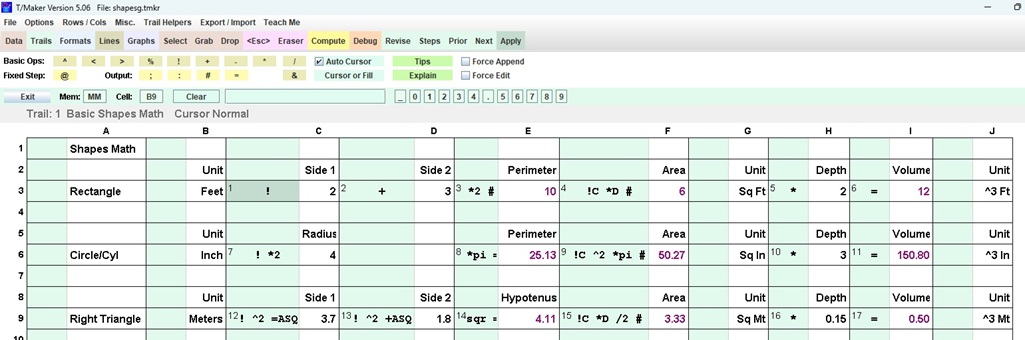
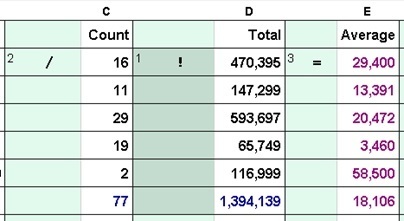
number sign # outputs the value but leaves it in the calculator.]Trail 1 to the right calculates the totals of columns C and D. That's one calculation trail used twice from different locations. Operators are placed next to the values they make use of. There is no need here to type or track down cell names. Before putting the total on the total line (=), the number is stored in a memory (#) designated as "Tot?". Memory names must start with at least two letters. If a memory name ends with a question mark, that symbol is replaced by the column letter in which it is found. This allows the same exact trail to store values in memories that have names different for each column. 77 would be put in memory TotC and the big number in TotD.
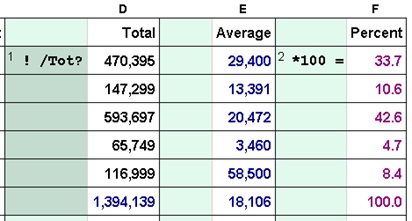
Trail 2 (far left, below) calculates Averages from the Total and the Count: Enter the Total into the calculator, divide by the Count, and put the result in the Average column. No mystery there. Trail 3 (middle, below) calculates the Percent of the Grand Total for all car models. You can now see the reason we stored that number in a memory. This Grand Total was created in the Total column (above). It is later recalled in trail 3 under that same column. Thus both refer to TotD.
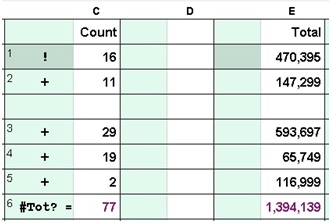
The image to the far right shows the first trail after a blank row and a column were inserted. As with the other two trails, the calculations remain perfectly correct because the steps moved along with the values they applied to. With other specifications, T/Maker would have had to make adjustments but not with this setup where symbols are placed next to the appropriate
values and memories are the only other technique used.
Cell names in algebra spreadsheets would have had to be changed for cells to the right of the inserted column and below the inserted row. The program would probably have done that but does anybody want to look at the forumlas in 14 different cells to be sure?
 With
Excel, the algebraic
formulas live in pigeon holes. The result of
a formula is displayed on a front door to the pigeon hole.
You can pull out every formula to
check it or help you remember what it does. This sounds reasonable but
the whole approach multiplies levels of abstraction and confusion times each before hiding them behind the door.
With
Excel, the algebraic
formulas live in pigeon holes. The result of
a formula is displayed on a front door to the pigeon hole.
You can pull out every formula to
check it or help you remember what it does. This sounds reasonable but
the whole approach multiplies levels of abstraction and confusion times each before hiding them behind the door.
 With
T/Maker, a trail has steps that can draw in values, do
calculations, and place new values in locations other than where the
steps reside. You decide what makes the most sense. Trails with many
steps typically serve a larger shared purpose developed between a first
step and a final one. While not always practical, the ability to lay out
the
trail of operations in executable order over the landscape of the data
is a light-of-day versus darkness-of-night game changer for many
problems.
With
T/Maker, a trail has steps that can draw in values, do
calculations, and place new values in locations other than where the
steps reside. You decide what makes the most sense. Trails with many
steps typically serve a larger shared purpose developed between a first
step and a final one. While not always practical, the ability to lay out
the
trail of operations in executable order over the landscape of the data
is a light-of-day versus darkness-of-night game changer for many
problems.It's just a click to flip between the trails to refresh your memory. Though most anything can be calculated, the "T" in "T/Maker" stands for "Table." It does an especially nifty job of doing those with a minimum of intellectual stress. You can also, for example, refer to a value in a row by its single letter column name. This notation blends perfectly with a trail that is used on multiple rows as in a table. Trail 2 above could have been completely specified in any green cell as !D /C =E
This one example as would hundreds like it makes some matters clear. T/Maker can take problems that many people could never, ever handle with Excel or Sheets and serve up gourmet solutions often using peanut butter and jelly techniques.
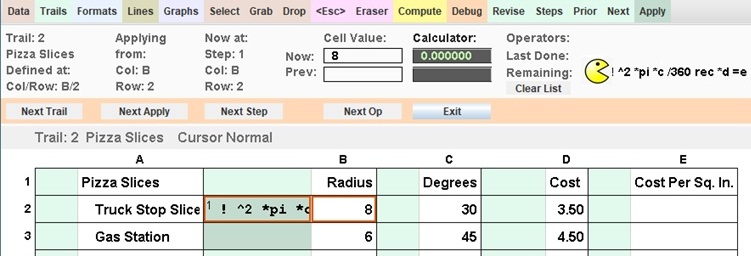 There
is a tool in T/Maker which is dedicated to helping find and correct
mistakes. While using it, I was
reminded of the enormously popular video game of Pac-Man. The game was unusually focused on eating rather than combat. Pac-Man's
bodiless head was inspired by a pizza with a missing slice. He zipped
around a maze with a voracious appetite for yellow dots on his way to
becoming a massive cultural icon of the 80's.
There
is a tool in T/Maker which is dedicated to helping find and correct
mistakes. While using it, I was
reminded of the enormously popular video game of Pac-Man. The game was unusually focused on eating rather than combat. Pac-Man's
bodiless head was inspired by a pizza with a missing slice. He zipped
around a maze with a voracious appetite for yellow dots on his way to
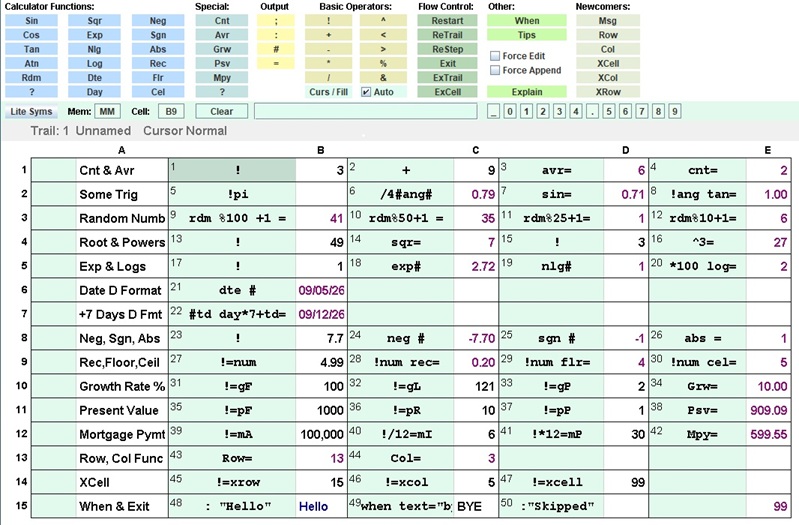
becoming a massive cultural icon of the 80's.What's similar? The Debugger in T/Maker walks through a spreadsheet like it's a maze while wolfing down instructions and displaying the consequences of each bite or byte. You can see all relevant values. In the upper right corner you can watch the remaining operations shrink as their predecessors are swallowed. Another similarity is that this activity, in addition to building confidence, is also kind of fun. Watch the Debugger Gobble Up Trails With A Click Here.

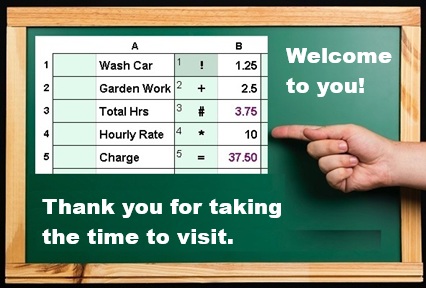
The important question here has nothing to do with Excel. It is included on this page only to show that algebraic spreadsheets are not an answer for diminishing math abilities. T/Maker's lack of sizzle in charts or built-in functions for various professions is not a concern either. That could be amended as appropriate with more experience and resources beyond myself. The meaningful question is: Could T/Maker's Calculation Trail With Trimmings be learned by individuals who have nothing beyond a hand calculator now? Would math then be more practical and usable for tasks like invoices, estimates, family budgets, deciding life choices, and teaching children to submit documented chore-based allowance claims?
Below is a list of new ideas in T/Maker intended to make everything easier and more obvious.
| Eliminate algebra and its notation (parens & precedence) |
Draw on calculator-style left-to-right arithmetic |
Identify data spacially or other ways, avoid cell names |
| See side by side columns for clarity of math and data |
Give trails powers way beyond a one cell formula | Use trails in multiple locations with just a click. |
| Make the order of calculations completely known | Set function parameters by loading particular memories |
Warn when data entered will be overwritten by a result |
| Clone rows with specs for tables where rows get added |
Use the cursor like a paintbrush with basic arithmetic symbols | Change the paintbrush symbol with a click |
| Use a remarkable debug tool with step by step read-outs |
Start at a particular trail and advance with leaps from tiny to big |
White-out calulated values to see results put in place |
| Autosize columns for a better views of math or data | Color code calculated results. Purple: new value with last Compute | Dark Blue: Same value as previous Compute |
| Use name-you-own memories to recall important values | Same-look interactive help screens for non-obvious tasks |
Incredible room to grow, fully programmable |
| Set up a fertile ground for customizable templates |
Trail names and comments can be saved with trails |
The debugger can demo all template calculations |
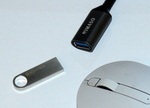
You can have T/Maker right here and now or get it in the mail on a thumb drive. Plug that into a USB Type-A connector and you are ready to rock and roll. The thumb drive includes T/Maker with examples and the WildWords Crossword Game. You will need to install the Java Runtime Environment (JRE). That one download is quick and backed by Oracle. Over one billion users have installed the JRE on their machines. The download or thumbdrive link is at the top of this page. There are still tutorials and more examples to do, but it is so easy to get going with many useful tasks.